 Cleanvid
 Object Remover
Tasks
Erase unwanted people, and objects from any video without blur.
Drag and drop your video file — MP4, MOV. Supports up to 1080P resolution. Everything runs in your browser.
Paint over the unwanted person, object, text, or watermark you want to erase. Enable Smart Motion Tracking for moving objects.
Once processing is complete, download your video in full original resolution — no blur, no quality loss.
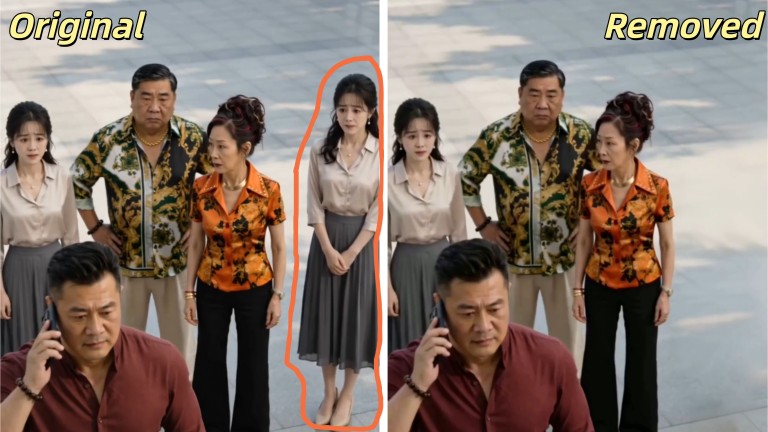
Erase unwanted people, strangers in the background. The AI intelligently detects the person's outline and fills the background with context-aware inpainting — frame by frame. Perfect for: travel videos, event footage, vlogs, street interviews

This is what sets Cleanvid apart. Our AI doesn't just remove static objects — it tracks and erases moving objects across frames. A car driving through your shot? A person walking across the scene? Mark it once, and Smart Motion Tracking follows it through every frame, reconstructing the background naturally as it moves. Perfect for: drone footage, city timelapses, sports videos, traffic scenes
Remove text watermarks, logogs, hardcoded subtitles, timestamps, or on-screen graphics from your video. The AI fills the text area with matching background content, so there's no visible trace that text was ever there. Perfect for: repurposing content, removing hardcoded subs, cleaning stock footage

Clean up messy backgrounds — remove power lines, trash cans, signs, poles, or any distracting elements that ruin an otherwise perfect shot. The AI fills the removed area with matching background texture seamlessly. Perfect for: real estate videos, landscape footage, product showcases.
Most object removers only work on static scenes. Cleanvid's AI tracks and erases moving objects — cars, people, animals — across every frame. Mark once, and the AI handles the rest.
Unlike basic tools that smudge or blur removed areas, Cleanvid uses context-aware AI inpainting to reconstruct the background with matching colors, textures, and lighting. No visible edit traces.
No software to install, no plugin to configure. Remove objects from video directly in your browser. Works on Windows, Mac, Linux. Just open Cleanvid and start editing.
Your video comes out at the same resolution it went in — up to 1080P, no compression loss. Unlike free tools that downgrade quality, Cleanvid preserves every pixel.
As a travel vlogger, I often shoot HD footage in crowded tourist spots. Getting a clean shot of a landmark is almost impossible. Since this tool is completely browser-based, I can just upload my clips directly from my laptop at a coffee shop. It removes tourists wandering into my frame effortlessly. The best part is that it exports in the exact same pristine 4K resolution without compressing my cinematic footage at all.
Alex R.
Travel YouTuber
During live event shooting, you can't control the environment. I had a beautiful, emotional shot of a wedding ceremony that was partially blocked by a guest raising their smartphone right in front of my lens. I fed the clip into this tool, and it completely erased the moving arm and phone. It magically reconstructed the bride's dress in the background without any ghosting or fuzzy spots, saving the most important moment of the film.
Michael O'Connor
Event and Documentary Filmmaker
We produce bite-sized drama series for the North American market, and our shooting schedules are incredibly tight. Recently, a boom mic and a stray coffee cup were accidentally left in a crucial emotional scene. Instead of throwing away a perfect performance, we used this object remover. It perfectly tracked and erased the moving mic from the shot, leaving the background textures completely intact as if nothing was ever there.
Emily Rostova
Post-Production Supervisor for Indie Films
My marketing team constantly tests different product showcase videos on social media. Often, we use stock footage or old shoots where we need to remove outdated props or distracting background elements. Because there is no app to install, my junior marketers can run the AI object removal right on their standard office laptops. Maintaining the original crispness of the video means our social media ads always look premium and trustworthy.
Jessica Lin
E-commerce Marketing Manager
A video object remover is an AI-powered tool that detects and erases unwanted objects, people, text, or watermarks from video footage. Unlike simple blur tools, advanced objectremovers like CleanVid use AI inpainting to reconstruct the background naturally frame by frame, leaving no visible blur, smudge, or patch behind.
Yes. Cleanvid's AI features smart motion tracking that follows and erases moving objects — like a person walking across the frame or a car driving by — across multiple frames. The AI intelligently fills in the background for each frame, even as the object moves.
No. Cleanvid uses AI-powered inpainting technology that reconstructs the background naturally instead of applying a blur effect. The tool matches surrounding colors, textures, lighting, and motion to create a seamless result — no visible blur, smudge, or patch.
Yes. Cleanvid offers a free trial that lets you remove people and objects from video online without any software download. Simply upload your video, mark the person you want to remove, and the AI processes it in your browser. For longer videos, affordable credit-based plans are available on our pricing page.
Cleanvid supports MP4, MOV, AVI, WEBM, and MKV formats. Input video can be up to 1080P resolution. Output is delivered in full original resolution with no quality loss.
Cleanvid's AI uses a combination of object detection, motion tracking, and frame-by-frame inpainting. When you mark an object, the AI identifies it, tracks its movement across all frames, and reconstructs the background behind it for each frame individually. This ensures natural-looking results even in dynamic scenes with camera movement.
Yes. Cleanvid is a 100% web-based tool. You can remove objects from video directly in your browser — no software download, no installation, no plugin. Works on Windows, Mac, and Linux with any modern browser (Chrome, Firefox, Safari, Edge).
Cleanvid offers a free trial to get you started — perfect for short clips. For longer videos or professional use, we offer affordable credit-based plans. You only pay for what you use, with no subscription required. Visit our pricing page for full details.
Still have questions? Contact us at [email protected]