 Cleanvid
 Watermark Remover
Tasks
MP4 and MOV formats are supported. Max 15 min, up to 2K resolution.
Select [BOX] for static watermarks, or switch to [FULL VIDEO] for moving ones.
Submit your task for removal. Download the watermark-free video after it completes.

CleanVid leverages cutting-edge AI to accurately identify and remove text from your videos. It restores the background at the pixel level, ensuring a flawless, trace-free result.
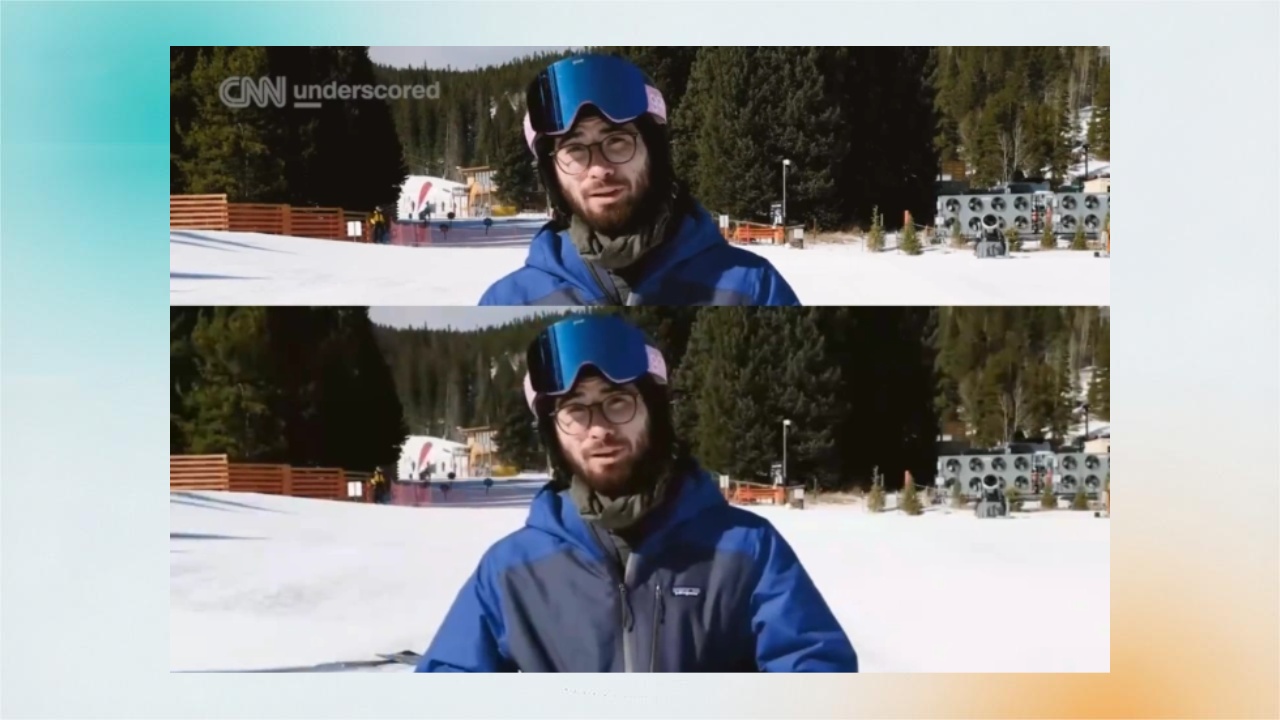
CleanVid utilizes advanced video segmentation to automatically detect and isolate logo watermarks of any complex shape. It performs precise frame-by-frame removal and restoration, ensuring a perfect video without blur.

Using advanced frame-by-frame analysis, Cleanvid tracks and flawlessly erase moving (or floating) watermarks. It seamlessly inpaints the removal area, delivering a crystal clear, blur-free result, stunning quality.
Discover the difference in video quality and background restoration.

Pixel-perfect restoration. Seamless remove floating watermarks.

Leaves obvious blurry patches. Unable to handle floating text watermarks.

On complex backgrounds, it leaves visible blur traces and tends to distort the background details.
Say goodbye to ugly pixelated patches and obvious mosaics. Cleanvid uses cutting-edge AI to intelligently fill in the missing pixels, leaving you with a flawless, natural-looking video.
You don't need professional video editing skills or complex masking techniques. Our smart AI automatically identifies and targets the elements you want to remove.
Save your computer's memory and CPU. Cleanvid is entirely cloud-based, meaning you can process heavy video files directly in your browser without downloading heavy software or needing a high-end PC.
As a content creator, I constantly remix and curate stock footage for my social channels. Cleanvid removes unwanted watermarks flawlessly without degrading the original video quality. It saves me hours of manual editing! — Sarah Jenkins, Social Media Influencer

Sarah Jenkins
Social Media Influencer
When launching ad campaigns, distracting logos from stock clips kill our conversion rates. Cleanvid's AI gives us clean, professional footage in minutes. The box selection tool is incredibly precise, giving our video ads a premium feel. — David Chen, Digital Advertising Manager

David Chen
Digital Advertising Manager
I compile various clips for my online courses. Removing timestamps and old text overlays used to be a nightmare. Now, I just upload the files to Cleanvid and get pristine instructional videos that keep my students focused on the lesson. — Emma Larson, E-Learning Content Producer

Emma Larson
E-Learning Content Producer
Distributing short dramas globally means we constantly need to clear original regional text and hardcoded logos for the US market. Cleanvid handles high-volume tasks perfectly, making our localization process highly efficient and ready for an international audience. — Michael Ross, Head of Global Content Distribution

Michael Ross
Head of Global Content Distribution
Cleanvid utilizes advanced video inpainting technology to erase various types of watermarks. Once removed, there are no obvious blurs or traces—often looking as if the watermark never existed. Cleanvid effectively removes text, logos, TV station IDs, subtitles, and floating watermarks. However, watermarks can be complex. Sometimes they blend seamlessly with the background, which may lead to imperfect removal. Therefore, we cannot guarantee perfect results for every single case. We are continuously optimizing our algorithms, and we welcome you to submit any "bad cases" to help us improve.
[BOX] method only detects and erases watermarks within the specific area you select. In [FULL VIDEO] method, Cleanvid automatically scans the entire video frame to identify and remove watermarks (ideal for moving/floating watermarks).
To remove floating watermarks, simply select the [FULL VIDEO] method. Cleanvid will automatically detect the moving watermark within the frame and remove it seamlessly.
Videos uploaded to Cleanvid are stored for 24 Hours. After this period, they will be automatically and permanently deleted. Please ensure you download your processed videos promptly.
Generally, a 1-minute video takes about 1 to 2 minutes to process. Please be patient while our AI works its magic!
Cleanvid charges based on video duration, billed in 30-second increments (any fraction of 30 seconds is charged as a full 30 seconds). [BOX] method: 5 credits per 30 seconds. [FULL VIDEO] method: 10 credits per 30 seconds. Please check our Pricing page for the exact credit purchasing rates.
Due to the limitations of current AI technology, we cannot guarantee 100% perfect results for every single video. If a watermark is heavily blended with a complex background, minor residues or artifacts may occur. If this happens, we do not recommend running the Watermark Removal tool multiple times on the same video. Instead, we highly recommend using our Object Removal feature to precisely target and clean up those specific residual areas.
Still have questions? Contact us at [email protected]